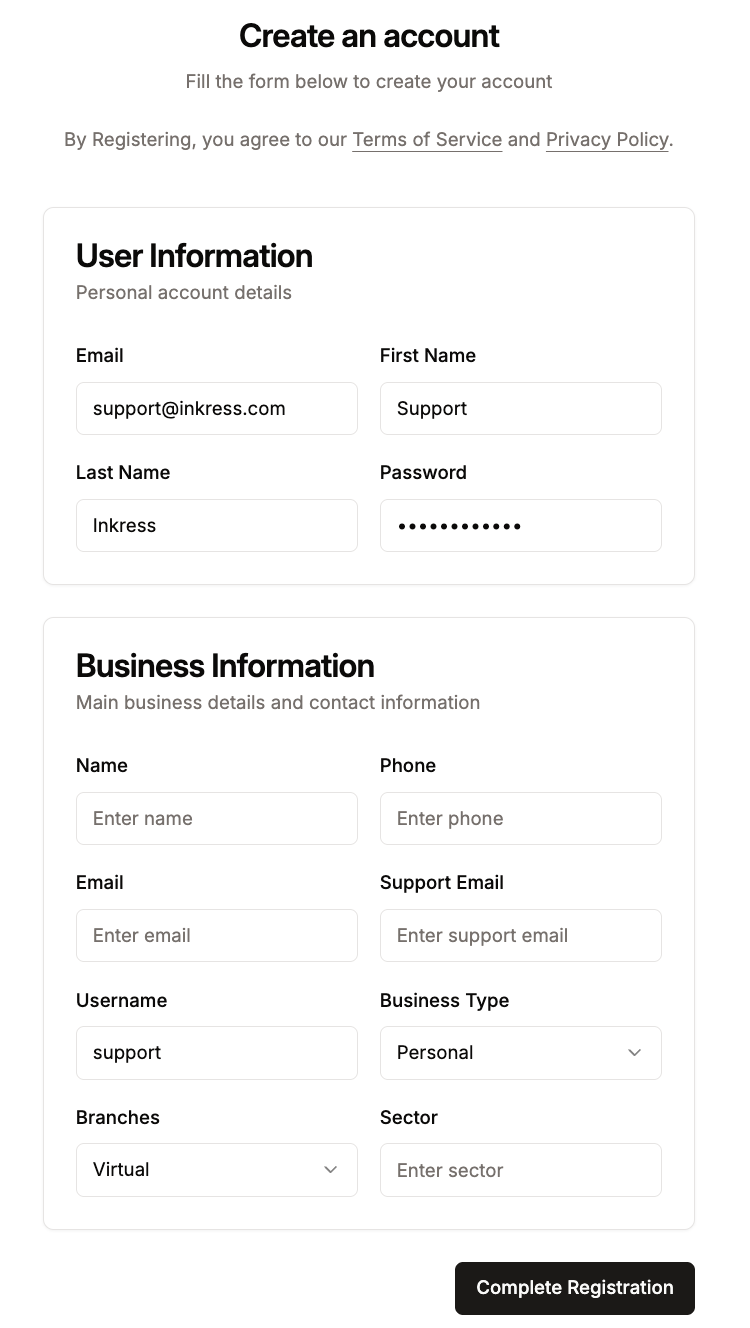
First off, let's see who can register:
-
Individuals
-
Registered Businesses
-
Registered Companies
We support all these account types.
To register with Inkress, you need to fill the form at: https://www.inkress.com/regsiter.
You'll need to enter the following information:
Your Personal Information
-
Name - Your full name is necessary for compliance
-
Email Address - you will use this to login to your account
-
Password - for you to access the account
Your Business Information
-
Name - Your business name
-
Phone - Your business phone number
-
Email Address - Inkress will communicate with you through this email address
-
Support Email Address - Your customers who purchase from your account will contact you through this email address
-
Username - This is your unique username/handle to be used across the Inkress platform
-
Business Type
-
Personal - You don't have a registered business or company - an individual
-
Sole-Trader - You have registered your business name
-
LLC - You have a registered Limited Liability Company
-
Non-Profit - You have a registered Non-Profit (you will be contacted for verification)
-
Alumni - You represent an Alumni Organisation (you will be contacted for verification)
-
Other - You do not see your organisation structure (you will be contacted for verification)
-
-
Branches - Let us know if you are a virtual company or have physical branches
-
Sector - What type of business you operate - logistics, retail, medical, etc.